
Atomistic simulation requires three things: knowledge of the science, compute-efficient implementation of simulations, and accessible interfaces to the simulation stack.
Official announcementNVIDIA Developer Blog
How AI Coding Agents Can Unlock Materials Simulation with NVIDIA ALCHEMI Toolkit
Atomistic simulation requires three things: knowledge of the science, compute-efficient implementation of simulations, and accessible interfaces to the... Atomistic simulation requires three things: knowledge of the science, compute-efficient implementation of simulations, and ac

The first remains the researcher’s domain, as no tool substitutes for knowing what to simulate or recognizing a physically meaningful result. NVIDIA ALCHEMI Toolkit, introduced earlier this year, has dramatically reduced the second barrier for Machine Learning Interatomic Potentials (MLIP) with composable, PyTorch-native building blocks for constructing GPU-accelerated simulation workflows with in-flight batching enabled.
The third barrier has persisted. Unlike classical force fields, the MLIP ecosystem is still nascent, and the accessible interfaces that exist for classical simulations are very limited. They run on a different software stack than the tools many computational chemists are accustomed to with new data structures, composition patterns, and dependencies.
AI coding agents offer a way through: They generate and execute code from natural-language descriptions written in the terms a researcher would use in daily technical discussions. But a general-purpose agent may not know the ALCHEMI Toolkit API, and can produce plausible-looking code that only appears to use it correctly.
ALCHEMI Toolkit agent skills and reference files provide the missing API patterns on demand, leaving the prompt to your science: the material, the conditions, and the constraints on the simulation protocol.
Building simulation workflows with a coding agent[](#building_simulation_workflows_with_a_coding_agent)
This post follows an end-to-end ALCHEMI Toolkit workflow: what the researcher starts with, how they prompt the agent, what code and simulation pipeline it produces, and how the results are validated on NVIDIA H200 GPUs. It also distills lessons from 45 generated pipelines into practical guidance for building trustworthy GPU-accelerated simulation workflows with coding agents.
How to get started[](#how_to_get_started)
System and package requirements[](#system_and_package_requirements)
- Python ≥3.11, <3.14
- PyTorch ≥2.8
- CUDA 12 or CUDA 13, with a compatible NVIDIA driver (570+ recommended)
- Operating System: Linux (primary), macOS
- NVIDIA GPU (RTX 20xx or newer), CUDA Compute Capability ≥ 7.0
- Minimum 4 GB RAM (16GB recommended for large systems)
Installation[](#installation)
How you set up the agent’s environment meaningfully affects the reliability of generated code. We recommend installing the Toolkit in a runnable Python environment and letting the agent execute the scripts it generates. In the final 45-pipeline campaign, this setup produced no broken imports or references to nonexistent APIs.
Step 1: Create a Python environment and install ALCHEMI Toolkit with uv package manager:
Installation through uv in a local folder # Create local environment at .venv uv venv --seed --python 3.12 # Install ALCHEMI Toolkit into .venv uv pip install "nvalchemi-toolkit[mace,ase]==0.2.0"
Related stories

Official announcement
Giga-Scale AI and the Ethernet Evolution: How Spectrum-X Ethernet Rewrites the Rules
NVIDIA Developer Blog
The massive growth of generative AI has fundamentally altered data center design. As distributed model training scales to span hundreds of thousands of GPUs,... The massive growth of generative AI has fundamentally altered data center design. As distributed model training scales

Official announcement
How we saved 100 terabytes of memory by optimizing 1.1.1.1’s DNS cache
Sebastiaan Neuteboom
Big Pineapple , the platform behind 1.1.1.1 , Gateway DNS , DNS Firewall , AS112 , and several other Cloudflare DNS services, stores over 250 billion DNS cache entries at any given time. At that scale, wasting a single byte per entry costs more than 250 gigabytes of memory across
Official announcement
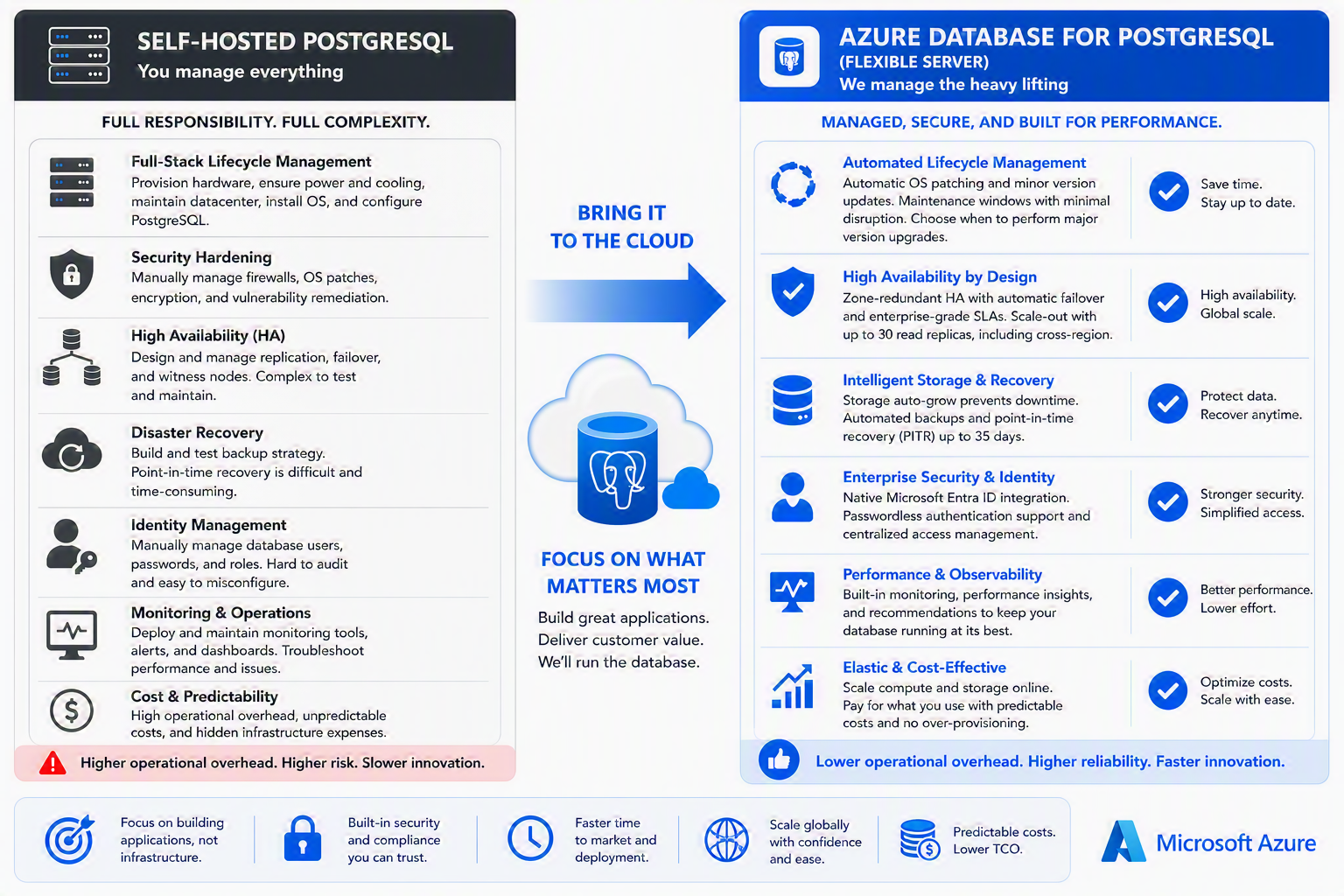
Managed PostgreSQL vs. self-hosted PostgreSQL: Key benefits and trade-offs
Lauro Ojeda
Summary This post is for technical decision makers evaluating where to run production PostgreSQL workloads. It compares two valid operating models—self-managed PostgreSQL and a managed database service—through business and operational outcomes: control, engineering capacity, resi

Official announcement
OpenClaw went viral. Meet the maintainers building and securing it.
Gregg Cochran
What began as a personal experiment quickly became a global open source project with extraordinary momentum. OpenClaw is a personal AI assistant that runs on users’ devices and connects with the messaging channels they already use. Started by Peter Steinberger as a weekend projec

Official announcement
IBM Brings AI-Powered US Open Fan Experience Back to Madison Square Park
IBM Newsroom
Join IBM for AI-powered tennis activations, live US Open match viewing, giveaways and more during Championship Weekend

Official announcement
3 new ways to plan and book travel in Search
Google AI Blog
Book hotels and track airfares, plus view miles and rewards with AI Mode in Google Search.