
Imagine you work in cybersecurity and you have a table that tracks login attempts. This table includes each login attempt as a success or failure and when the attempt took place. You want to find strange login patterns, so you might ask the question, “which users had consecutive login failures, followed by success?” Finding this type of suspicious activity with standard SQL is challenging. SQL treats rows as unordered sets of facts without a timeline and there is no inherent concept of a sequence of events.
Official announcementDatabricks Blog
"Regex for Rows": Simplifying Pattern Detection in SQL with MATCH_RECOGNIZE
Imagine you work in cybersecurity and you have a table that tracks login attempts...
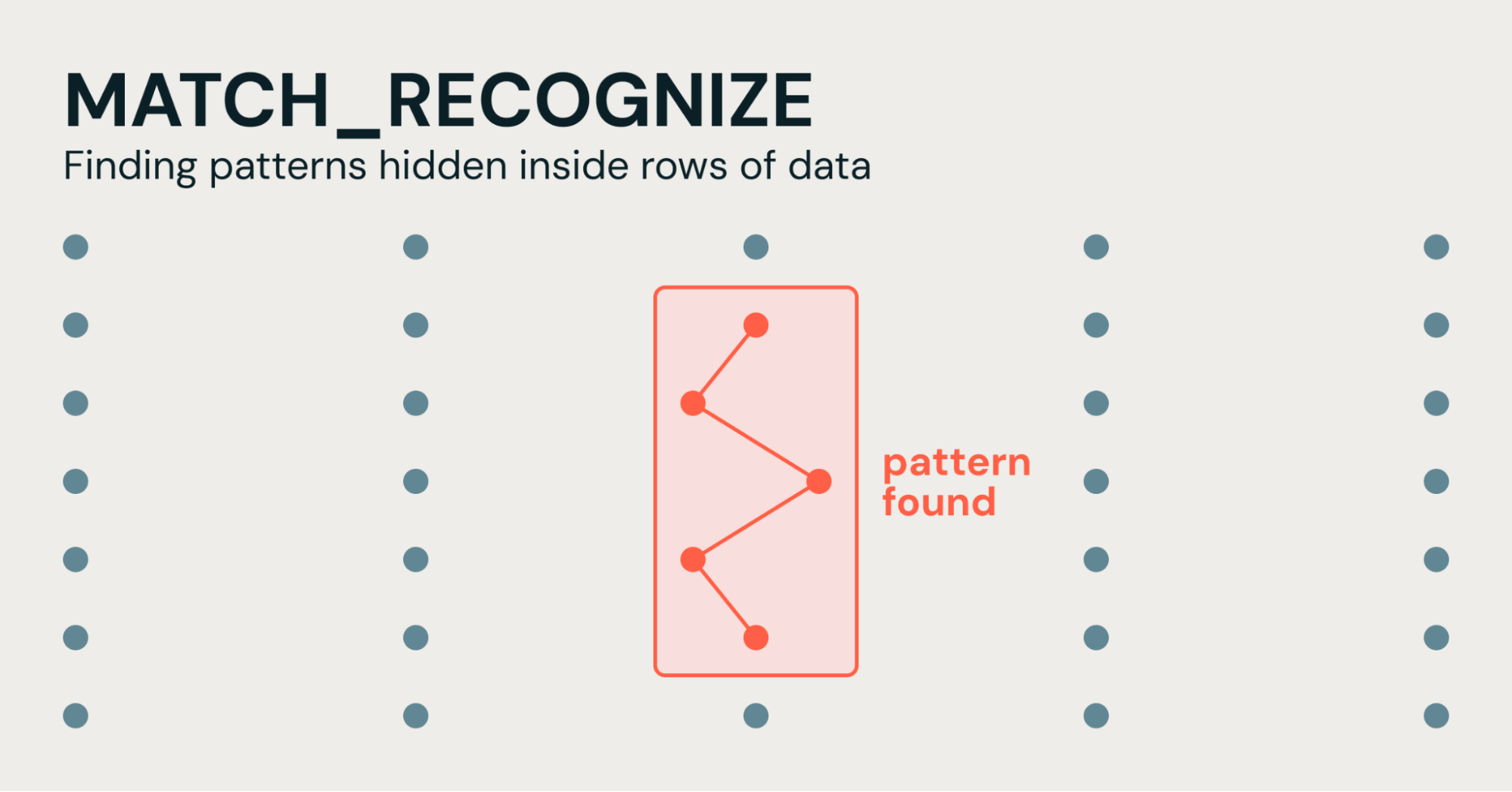
You could count failed logins per user, but counts won’t help you understand if these login attempts were a narrow timespan or spread out over a month; and it can’t tell you if a successful login occurred right after the failures. To do that in SQL, you will end up with a complex query that chains multiple common table expressions together, anchoring the time window to the first failure, then checking each subsequent row.
MATCH_RECOGNIZE simplifies this. Now available in Databricks compute (including Lakehouse Real-Time), MATCH_RECOGNIZE lets you describe the sequence you care about directly, like a regular expression for rows. One SQL clause now handles the pattern matching and you’ve eliminated overly complicated SQL reliant on “gaps and islands” logic.
Let’s look at industry-specific examples of how MATCH_RECOGNIZE makes sequence detection simple across different industries.
Cybersecurity: Identifying suspicious log-in anomalies
If you’re searching for credential stuffing in authorization logs, simply counting login attempts can lead to false positives. You specifically need to detect high-frequency spikes, such as 5 or more failed login attempts within a specific narrow time-window, immediately followed by a successful login.
Standard COUNT() OVER (PARTITION BY user_id ORDER BY event_time) window functions can tell you how many failures occurred in a time frame, but they cannot easily anchor a sliding time window to the first failure in a specific sequence, nor can they cleanly isolate the sequence once a success occurs.
With MATCH_RECOGNIZE, you can use FIRST(FAIL.event_time) directly inside the DEFINE block to anchor the timestamp of the initial failed attempt. Every subsequent FAIL event is dynamically checked to ensure it falls within 1 hour of that first attempt before transitioning to the SUCCESS state.
SELECT FROM auth_logs
MATCH_RECOGNIZE (
PARTITION BY user_id
ORDER BY event_time
MEASURES
FIRST(FAIL.event_time) AS attack_start,
LAST(FAIL.event_time) AS last_failed_attempt,
SUCCESS.event_time AS breach_time,
COUNT(FAIL.) AS total_failed_attempts
ONE ROW PER MATCH
AFTER MATCH SKIP PAST LAST ROW
PATTERN (FAIL{5,} SUCCESS)
DEFINE
FAIL AS status = 'FAILED'
AND (FIRST(FAIL.event_time) IS NULL
OR event_time <= FIRST(FAIL.event_time) + INTERVAL 1 HOUR),
SUCCESS AS status = 'SUCCESS'
)
Financial Analysis: Detecting v-shaped stock trends
Every market data analyst cares about price reversals, moments when a stock loses value, then suddenly starts gaining it back. This shape is known as a "V-shape," and finding it in standard SQL means reaching for a technique called "gaps and islands": since SQL has no native idea of a trend, you first have to manually carve your rows into "islands" (consecutive stretches where the price is moving in the same direction) before you can even ask where a V-shape starts and ends.
In practice, that means using LAG and LEAD to compare each row to its neighbors, building a running counter that increments every time the direction flips (so you have a group ID for each island), and then writing HAVING filters to confirm each island's shape and boundaries. It's a lot of scaffolding just to answer a simple question: "where did the price dip and recover?"
The MATCH_RECOGNIZE clause eliminates the need for this scaffolding. You simply partition the data by symbol, order it by time, and define the shape of the V-trend as a sequence of regex-like states.
SELECT FROM stock_ticks
MATCH_RECOGNIZE (
PARTITION BY symbol
ORDER BY trade_time
MEASURES
FIRST(DOWN.trade_time) AS dip_start_time,
LAST(UP.trade_time) AS recovery_time,
FIRST(DOWN.price) AS pre_dip_price,
MIN(DOWN.price) AS trough_price,
LAST(UP.price) AS recovered_price
ONE ROW PER MATCH
AFTER MATCH SKIP PAST LAST ROW
PATTERN (DOWN{3,} UP{3,})
DEFINE
DOWN AS price < PREV(price),
UP AS price > PREV(price)
)
E-Commerce: Detecting check-out abandonment
Product managers want to find users with high-intent, but who never complete the purchase. Users who demonstrate real purchase intent, but then go silent, is a valuable signal. Identifying this set of users can help: determine which users to send a reminder, easily measure the opportunity and what percentage is recoverable with follow-up actions, and as a point of comparison with other users in this cohort, discovering a new insight (like a certain product is priced too high). A high-value failed conversion funnel tracks users who:
- Viewed a product page two or more times (VIEW 2 or more times, indicating high interest)
- Added the item to their cart (ADD_TO_CART)
- Ultimately abandoned the session (using a time-filter)
- The last step is not based on a value, but a time-range based on user activity. There is no “abandon” row to match or “check out error”, the user simply stops. In traditional SQL you prove a negative with NOT EXISTS subqueries, self-joins, and window functions to show that nothing happened after the items were added to the cart, and enough idle time had passed to consider the cart abandoned.
MATCH_RECOGNIZE expresses "nothing happened after this" directly with the end-of-partition anchor $, which forces the cart add to be the last recorded event in the session. Add a time filter for the idle window and you have a timeout-based abandonment rule with no self-joins.
SELECT
FROM (
SELECT
FROM web_clickstream
MATCH_RECOGNIZE (
PARTITION BY session_id
ORDER BY event_time
MEASURES
FIRST(VIEW.event_time) AS journey_start,
COUNT(VIEW.) AS total_product_views,
ADD_TO_CART.event_time AS last_activity_time
ONE ROW PER MATCH
AFTER MATCH SKIP PAST LAST ROW
PATTERN (VIEW{2,} ADD_TO_CART $)
DEFINE
VIEW AS event_type = 'VIEW_PRODUCT',
ADD_TO_CART AS event_type = 'ADD_TO_CART' AND cart_item_count > 0
)
)
WHERE last_activity_time < current_timestamp() - INTERVAL 30 MINUTES;
Manufacturing / IoT: Predicting equipment failures from sensor data
Predictive maintenance depends on spotting trends and patterns. With any machine in-use, its internal temperature tends to increase, but a sequence of steady temperature increase, followed by a vibration spike could signal a pending failure.
Traditional SQL requires rolling row-by-row comparisons to continuously attempt to detect a dangerous trend. MATCH_RECOGNIZE handles row-by-row logic natively. Inside the DEFINE clause you can use PREV and NEXT functions (which act similar to LAG and LEAD). This means setting up a rising temperature rule is as simple as writing temperature > PREV(temperature).
SELECT FROM device_telemetry
MATCH_RECOGNIZE (
PARTITION BY device_id
ORDER BY reading_time
MEASURES
FIRST(RISING_TEMP.reading_time) AS heating_started,
SPIKE.reading_time AS spike_detected,
FIRST(RISING_TEMP.temperature) AS initial_temp,
LAST(RISING_TEMP.temperature) AS peak_temp,
SPIKE.vibration AS anomalous_vibration
ONE ROW PER MATCH
AFTER MATCH SKIP PAST LAST ROW
PATTERN (RISING_TEMP{4,} SPIKE)
DEFINE
RISING_TEMP AS temperature > PREV(temperature),
SPIKE AS vibration > PREV(vibration) 1.5
)
Try Match Recognize on Lakehouse today
It's now easier than ever to uncover data patterns and simplify event-sequence analytics. MATCH_RECOGNIZE allows you to write less code for pattern matching in a logical way. This clause is easier to validate, easier to maintain, and straightforward to update.
- Explore the Documentation: Dive into the official SQL reference documentation to learn more about advanced pattern syntax, quantifiers, and measure aggregates.
- Try It in Your Workspace: Test out the examples above on your own log streams, clickstream sessions, or time-series telemetry in Databricks SQL or Lakehouse//RT.
- Migrate Legacy Pipelines: Identify your most complex window-function and self-join CTEs and let Genie Code assist in rewriting them with simpler MATCH_RECOGNIZE queries.
- The best data warehouse is a Lakehouse. Our native capabilities continue to expand and allow you to do more powerful analytics on a single, unified platform.
Related stories
Official announcement
Migrating the GitHub Copilot runtime to Rust, using Copilot
GitHub BlogStephen Toub
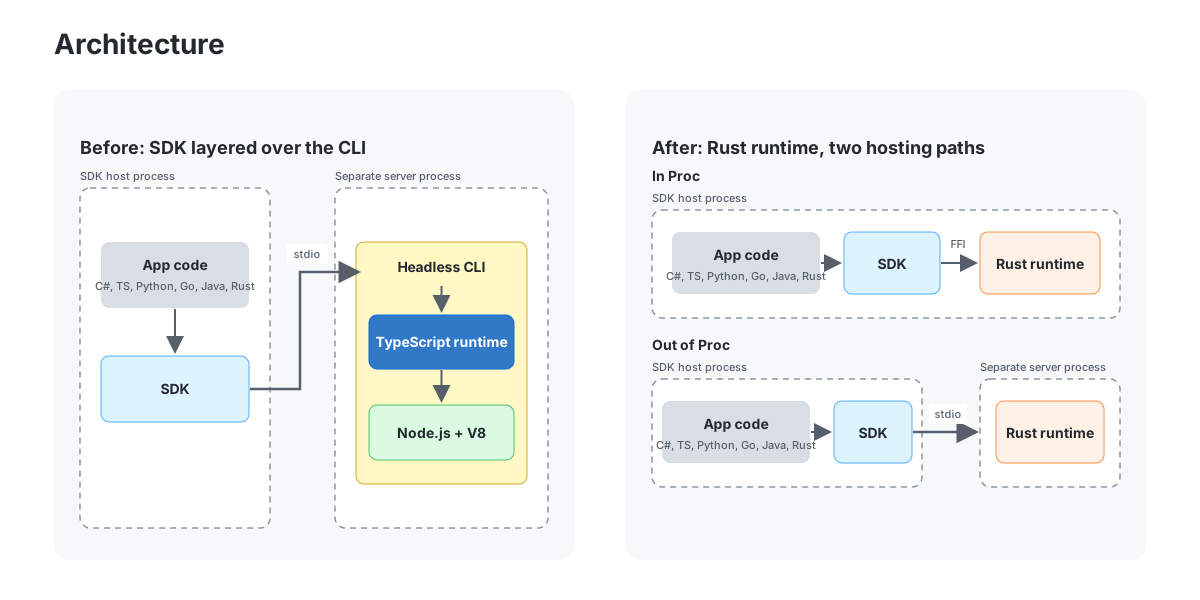
The GitHub Copilot CLI , GitHub Copilot app , and GitHub Copilot SDK are all backed by the Copilot agent runtime, an agentic harness that can be embedded into applications and services. It was originally written in TypeScript on Node.js and the V8 JavaScript engine for what is no

Official announcement
How to Use AI Agents to Prepare 3D Scenes for Simulation
NVIDIA Developer Blog
Agentic AI workflows can be used to prepare and validate digital twins for physical AI systems. Agents can inspect 3D scenes, author simulation-relevant data in... Agentic AI workflows can be used to prepare and validate digital twins for physical AI systems. Agents can inspect 3

Official announcement
TensorRT Edge-LLM Completes the MLPerf Edge Agentic Benchmark 6.4x Faster on Jetson AGX Thor
NVIDIA Developer Blog
AI agents are moving from cloud data centers to vehicles, robots, and other edge devices. Unlike a chatbot that answers a single prompt, an agent works through... AI agents are moving from cloud data centers to vehicles, robots, and other edge devices. Unlike a chatbot that answe

Official announcement
Translating CUDA Tile Operations from Python to Rust Using Agentic AI
NVIDIA Developer Blog
cuTile Rust (cutile-rs) is a tile-based system for safe, idiomatic GPU kernel authoring in the Rust programming language. Extending the Rust ownership model to... cuTile Rust () is a tile-based system for safe, idiomatic GPU kernel authoring in the Rust programming language. Exte
Official announcement
Threads Introduces Parental Supervision for Teens in APAC
Meta NewsroomFacebook
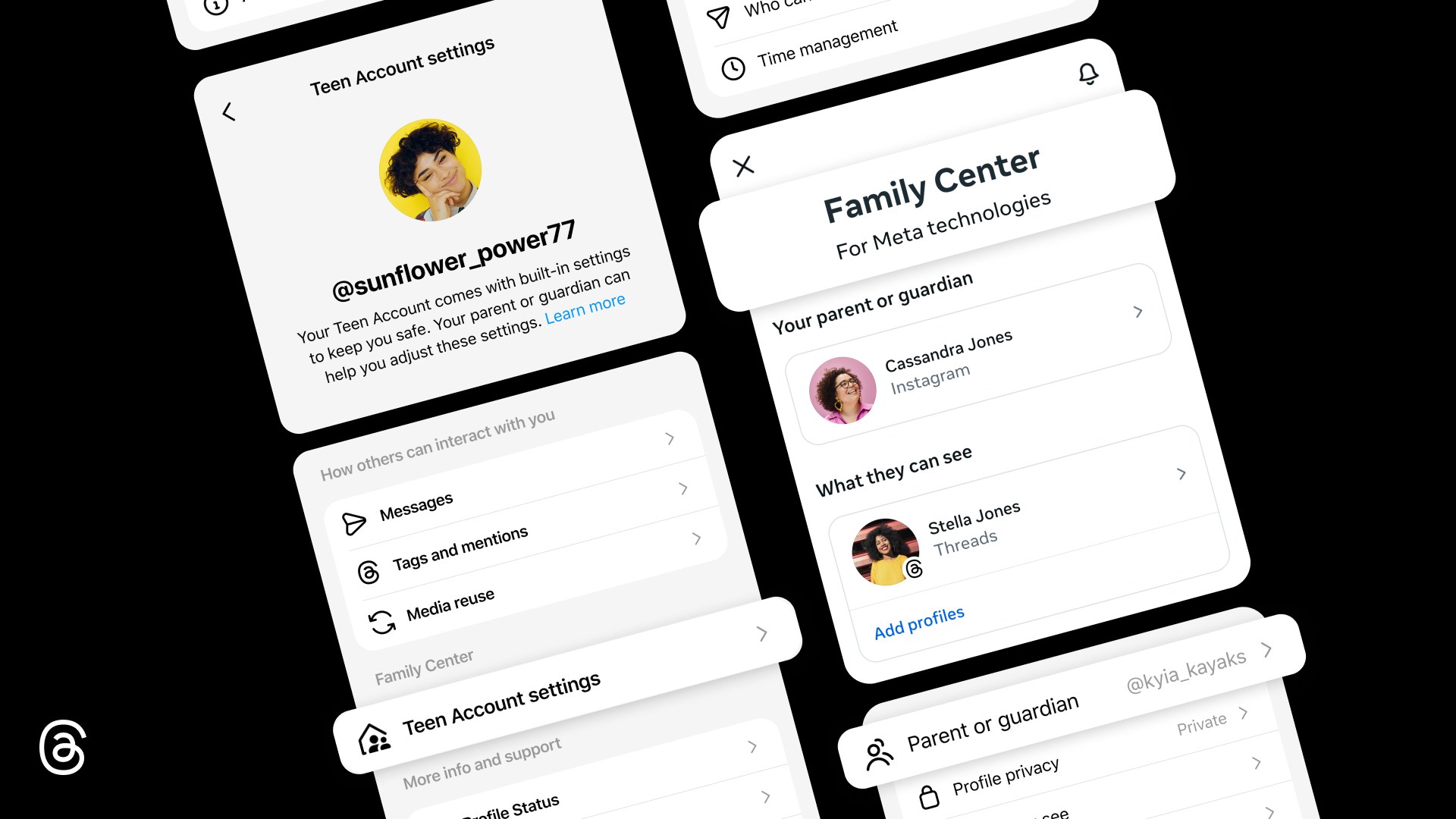
As part of our ongoing commitment to providing parents with helpful tools to support their teens across Meta’s apps, we’re bringing parental supervision to Threads. Starting this week in Asia Pacific countries, parents and guardians in Family Center will have visibility and contr

Official announcement
Per-User Quotas for AI: Govern Individual Spend in Snowflake
Snowflake Blog
Per-user quotas are now generally available in Snowflake. Set individual credit limits on AI Functions, Cortex Agents, CoWork and more — with automatic blocking, notifications and custom actions to govern AI spend at the person level.