
I might be biased, but I think Dependabot is pretty amazing. It helps keep my projects up to date, ensuring I’m always using secure libraries. But because there’re frequently new vulnerabilities, there’re frequently new pull requests from Dependabot.
Official announcementGitHub BlogChristopher Harrison
GitHub Copilot app for Beginners: Automate Dependabot pull request triage
I might be biased, but I think Dependabot is pretty amazing. It helps keep my projects up to date, ensuring I’m always using secure libraries. But because there’re frequently new vulnerabilities, there’re frequently new pull requests from Dependabot. Sometimes it’s a minor versio

Pexels (free commercial use)
Sometimes it’s a minor version bump. Sometimes it’s a major version upgrade. Sometimes everything will work just fine. And sometimes… well, every single developer has been caught by a breaking change.
How can we best triage these pull requests? The work isn’t particularly difficult per se, but it certainly is repetitive.
It’s the perfect task to offload to Copilot! With GitHub Copilot app automations, you can hand off that first round of review. Instead of manually inspecting every Dependabot pull request, you can create an automation that reviews open pull requests, groups them by risk, verifies CI status, and delivers a summary before your day begins.
Follow the steps below to build a daily Dependabot triage automation.
Step 1: Create a new automation
From the GitHub Copilot app, create a new automation.
You’ll configure two things first:
- Name: Give the automation a descriptive name, such as Daily Dependabot Triage.
- Trigger: Decide when it should run.
Available trigger options include:
- Manual
- Hourly
- Daily
- Weekly
- When an issue is created
For recurring maintenance tasks like Dependabot reviews, a daily schedule is often a good choice. For example, you might schedule it to run before your workday begins so the results are waiting when you log in.
You can also choose whether the automation runs in the cloud or on your local machine.
Step 2: Describe the task in natural language
Next, tell Copilot what you want it to do.
For example:
Review the open Dependabot pull requests, group them by risk, identify the safe patch and minor version updates, verify that CI is passing for each pull request, and provide a short summary of the recommended next steps.
Because the prompt uses natural language, you can customize it to match your team’s workflow.
Step 3: Select the repository
Choose the repository or project the automation should analyze.
Once you’ve selected the repository, create the automation.
If you want to test it immediately instead of waiting for the scheduled run, choose Create and Run.
Step 4: Review the results
When the automation finishes, Copilot returns a summary instead of a list of individual pull requests.
For example, it might:
- Group safe patch updates together
- Separate minor and major version upgrades
- Identify which pull requests have passing CI
- Highlight dependencies that require additional investigation
Rather than interrupting your morning with dozens of small decisions, you can quickly identify which updates are ready to merge and which deserve closer attention.
Step 5: Continue the work in a Copilot session
If one of the updates requires additional work, you can continue directly from the automation results.
For example, if the summary identifies a major framework upgrade, you can start a new Copilot session from the results and ask Copilot to help complete the migration.
Because the session starts with the automation’s context, you don’t have to gather the information again.
Review previous automation runs
Every automation run is saved, making it easy to see:
- When it ran
- What actions it performed
- What results it produced
Having a history of each run makes automations transparent. You can always review what happened instead of treating them as a black box.
Turn repetitive work into background work
Dependabot triage is a good example of the kind of recurring task that’s well suited for automation. You describe the workflow once, choose when it should run, and let Copilot perform the repetitive steps automatically.
If you’re just getting started with automations, begin with a task you already perform on autopilot. Let Copilot handle the routine work so you can spend your time on the decisions that require your expertise.
Ready to automate your next recurring task? Create your first automation in the GitHub Copilot app >
The post GitHub Copilot app for Beginners: Automate Dependabot pull request triage appeared first on The GitHub Blog.
Related stories

News summary
Anthropic pushes into physical world with new standard to help AI agents operate machines - CNBC
Anthropic News
Anthropic pushes into physical world with new standard to help AI agents operate machines CNBC

Official announcement
AWS Elastic Disaster Recovery introduces Recovery Plans for orchestrated application recovery
AWS What’s New
AWS Elastic Disaster Recovery (AWS DRS) now offers Recovery Plans, a capability that automates the sequential launch of multi-server applications during recovery and drills. Instead of launching servers one at a time and tracking dependencies manually, you define the recovery seq

Official announcement
Giga-Scale AI and the Ethernet Evolution: How Spectrum-X Ethernet Rewrites the Rules
NVIDIA Developer Blog
The massive growth of generative AI has fundamentally altered data center design. As distributed model training scales to span hundreds of thousands of GPUs,... The massive growth of generative AI has fundamentally altered data center design. As distributed model training scales

Official announcement
How AI Coding Agents Can Unlock Materials Simulation with NVIDIA ALCHEMI Toolkit
NVIDIA Developer Blog
Atomistic simulation requires three things: knowledge of the science, compute-efficient implementation of simulations, and accessible interfaces to the... Atomistic simulation requires three things: knowledge of the science, compute-efficient implementation of simulations, and ac

Official announcement
How we saved 100 terabytes of memory by optimizing 1.1.1.1’s DNS cache
Sebastiaan Neuteboom
Big Pineapple , the platform behind 1.1.1.1 , Gateway DNS , DNS Firewall , AS112 , and several other Cloudflare DNS services, stores over 250 billion DNS cache entries at any given time. At that scale, wasting a single byte per entry costs more than 250 gigabytes of memory across
Official announcement
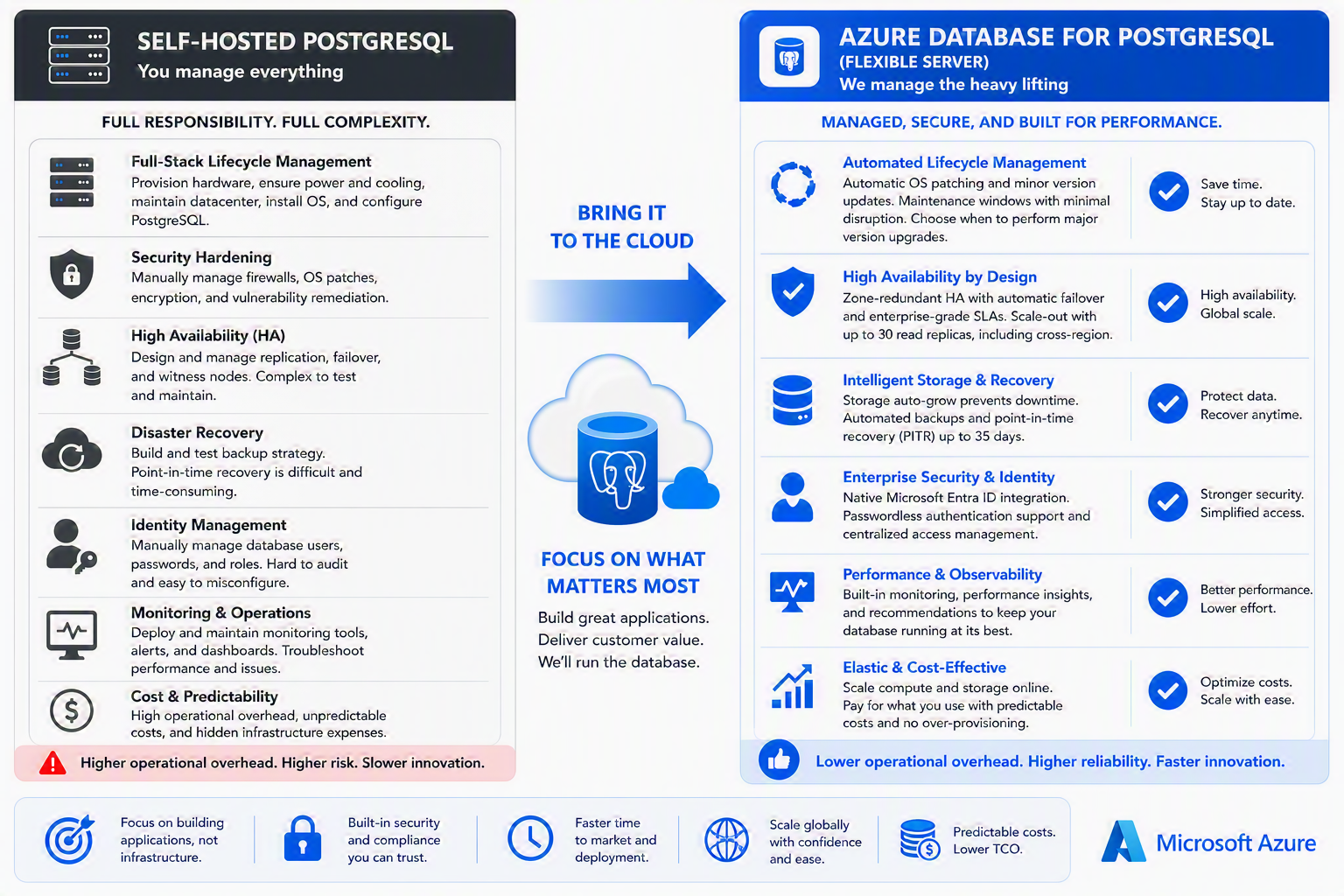
Managed PostgreSQL vs. self-hosted PostgreSQL: Key benefits and trade-offs
Lauro Ojeda
Summary This post is for technical decision makers evaluating where to run production PostgreSQL workloads. It compares two valid operating models—self-managed PostgreSQL and a managed database service—through business and operational outcomes: control, engineering capacity, resi