
Snowpipe Streaming’s high-performance architecture supports both v2 and v3, but omitting the parameter defaults the table to v2.
Official announcementSnowflake Blog
Streaming Data into Apache Iceberg with Snowflake
Snowpipe Streaming’s high-performance architecture supports both v2 and v3, but omitting the parameter defaults the table to v2. Next, the consumer: Full-scale streaming evaluation without the infrastructure lift The target is a Snowflake-managed Iceberg table. Rows stream in thr

Pexels (free commercial use)
Next, the consumer:
Full-scale streaming evaluation without the infrastructure lift
The target is a Snowflake-managed Iceberg table. Rows stream in through the SDK and land as Parquet with Iceberg metadata, managed by Snowflake. Point it at your own S3 external volume later if you want, or leave it managed after the evaluation. The code stays the same either way.
For the evaluation it means less setup. A table on Snowflake managed storage skips the external volume, storage integration and cloud storage permissions you'd otherwise have to configure first.
When you're ready to productionize, you've got three clear paths:
- Snowflake-managed Iceberg with an external volume: Parquet files are stored in your S3 bucket. An external engine reads the Parquet files directly from S3, using the Horizon REST Catalog for metadata.
- Snowflake-managed Iceberg on Snowflake storage: The files are in Snowflake's internal storage. This option avoids configuring an external volume and associated cloud storage. Leverages Iceberg features for compatibility going forward.
- Native Snowflake table: No separately managed external storage infrastructure is required for this configuration.
- Snowpipe Streaming doesn't write a file per row. The SDK sends rows as soon as you call
appendRows, but a server-side buffering tier absorbs them and decides commit timing on its own, batching under the hood so you're never shipping a file per row.
On top of that, Snowflake runs automatic compaction in the background for Snowflake-managed Iceberg tables where Snowflake is the sole writer: Small Parquet files get merged into larger ones, and small manifests get compacted too. You don't schedule it or run it; it's bundled into normal operation.
What you can do:
- Batch rows client-side before calling
appendRows: Sending rows one at a time still means one roundtrip per row; batching them into a single call amortizes that overhead, the same principle behind Snowflake's own guidance to compress and send more data per request.
- Keep channels long-lived: Open a channel once per source partition and leave it open for the life of the job instead of opening and closing per micro-batch. It's Snowflake's documented best practice for Snowpipe Streaming, and it cuts overhead without fighting the batching already happening underneath.
- Set
TARGET_FILE_SIZEon the table: This is a table-level property, independent of the SDK, that tells Snowflake what size to target for both new writes and background compaction, no matter how the data got there.
- Let throughput do the work: The higher your sustained TPS, the faster the server-side buffer fills and flushes on its own, which effectively results in a trade off between throughput and latency for a given file size.
Why SPCS to generate the load?
What's coming: Iceberg v4
To be clear, Snowpipe Streaming doesn't need SPCS. The SDK runs anywhere: your laptop, an EC2 box, a Kubernetes pod.
Putting it in SPCS is what gets you to the test faster since the service runs entirely on infrastructure Snowflake already manages, with nothing new to provision or additional sign-offs to manage for the test itself.
Java, Node and the REST interface follow the same shape: open a channel, insert rows, flush. There's a working example for each in the repo, so you can test whichever matches your stack.
To try this yourself you can check out the repo.
But be aware that the Streaming SDK uses a separate ingest endpoint over HTTPS, so even if you are running inside Snowflake you need to grant an external access integration that allows egress back to *.snowflakecomputing.com.
We wanted to build a demo where everything runs inside Snowflake infrastructure. Multiple Docker containers running in Snowpark Container Services (SPCS) generate synthetic test data at your target transactions per second and stream it using the Snowpipe Streaming SDK. It lands in a Snowflake-managed Iceberg table: open format, queryable within seconds of landing, governed in Snowflake. Authentication is easy: SPCS injects a short-lived OAuth token into the container telling the Streaming SDK to use it. You don't need to manage any secrets.
The code: Building it yourself
Best practices
To help understand how this all works, here is some pseudocode to help visualize how this works. The full code is in the repo, and there are several alternative demos linked below.
Start with a Snowflake-managed Iceberg table and a pipe:
Then you deploy the consumer to SPCS with a short service spec. And you watch it land:
For a team trying to find out whether Snowpipe Streaming holds up at 1M+ TPS, you want the shortest path to a real answer. Streaming at scale has a reputation. It's the workload teams put off, because standing it up entails S3 buckets, an EKS cluster, Kafka topics, IAM policies, a security review and sign-off from three platform teams who each have their own backlogs. That setup can require additional infrastructure provisioning and coordination before testing begins. Proving these pipelines work at the scale and handle production volume is usually its own project.
In our demo environment, we were able to set up and run this evaluation in an afternoon. You can use our Snowpipe Streaming High-Performance Architecture to stream data into Apache Iceberg™ format at over 1M TPS, entirely inside Snowflake infrastructure. A container running in Snowpark Container Services (SPCS) generates the load, streams it through the SDK and lands it in a Snowflake-managed Iceberg table. That makes it ready to query in Snowflake right away, with role-based access control (RBAC), lineage and masking all applied as it arrives. In our test environment, we stood up the demo, tested it end to end, measured throughput and tore it down in an afternoon, as we did in our test.
This post will walk you through how to actually build an end to end streaming to Iceberg demo, using this GitHub Repo. This example is in python but you can test the SDK options (Java, Python, Node, REST), so that you can credibly recommend this to your business with real results to show.
Demo: See it running
When you run the demo script you can see the SPCS service starts, the producer begins generating the load, and the consumer streams it into the Iceberg table.
You can switch to Snowsight, and see the row count climb here as well — millions of rows, queryable as they land.
In this post, we demonstrated how effective Snowpipe Streaming into Iceberg can be. At the kind of load at which a serious media or telco platform runs, with no S3 bucket, EKS cluster, Kafka topic, or IAM role required for this test setup, the workload ran inside Snowflake and could be torn down after the evaluation.
The infrastructure that normally sits between a team and a streaming test, the buckets and clusters and auth and sign-offs, isn't a prerequisite. You can answer, "Does this meet our requirements quickly?".
If you're on the Site Reliability Engineering (SRE) or Data Engineering side of a large media or telco platform and Iceberg streaming is on the roadmap, start with the test, not the procurement cycle. We invite you to clone the repo, deploy to SPCS and watch it run.
- Try it now with the GitHub repo
- Go deeper by exploring the Snowpipe Streaming High-Performance Architecture documentation
Architecture diagram: The pattern
Snowpipe Streaming and automatic compaction address the physical small-files problem, but frequent commits can still create overhead in Iceberg’s metadata tree. Each commit currently writes a new metadata JSON, manifest list and manifest — even when it contains only one small file. For workloads that commit every few seconds, that repeated metadata work can become the bottleneck.
The Iceberg v4 proposal introduces an Adaptive Metadata Tree to reduce that write amplification. Instead of creating a new manifest for every small commit, the root manifest can inline those commits. A single Parquet write and an atomic pointer swap replace the current chain, keeping metadata I/O per commit constant rather than scaling with manifest count. For high-frequency streaming workloads, that can dramatically improve streaming latency.
Streaming is one of the hero scenarios for Iceberg v4: Workloads that commit every few seconds expose metadata-write amplification directly, making the benefits of the Adaptive Metadata Tree especially relevant. The v4 spec is still evolving, but it’s worth watching if Iceberg streaming is on your roadmap. Snowflake is proud to participate actively in shaping the future of the format.
What this means for your architecture
Snowpipe Streaming batches for you
Landing directly into Iceberg
Related stories

News summary
Anthropic pushes into physical world with new standard to help AI agents operate machines - CNBC
Anthropic News
Anthropic pushes into physical world with new standard to help AI agents operate machines CNBC

Official announcement
AWS Elastic Disaster Recovery introduces Recovery Plans for orchestrated application recovery
AWS What’s New
AWS Elastic Disaster Recovery (AWS DRS) now offers Recovery Plans, a capability that automates the sequential launch of multi-server applications during recovery and drills. Instead of launching servers one at a time and tracking dependencies manually, you define the recovery seq

Official announcement
Giga-Scale AI and the Ethernet Evolution: How Spectrum-X Ethernet Rewrites the Rules
NVIDIA Developer Blog
The massive growth of generative AI has fundamentally altered data center design. As distributed model training scales to span hundreds of thousands of GPUs,... The massive growth of generative AI has fundamentally altered data center design. As distributed model training scales

Official announcement
How AI Coding Agents Can Unlock Materials Simulation with NVIDIA ALCHEMI Toolkit
NVIDIA Developer Blog
Atomistic simulation requires three things: knowledge of the science, compute-efficient implementation of simulations, and accessible interfaces to the... Atomistic simulation requires three things: knowledge of the science, compute-efficient implementation of simulations, and ac

Official announcement
How we saved 100 terabytes of memory by optimizing 1.1.1.1’s DNS cache
Sebastiaan Neuteboom
Big Pineapple , the platform behind 1.1.1.1 , Gateway DNS , DNS Firewall , AS112 , and several other Cloudflare DNS services, stores over 250 billion DNS cache entries at any given time. At that scale, wasting a single byte per entry costs more than 250 gigabytes of memory across
Official announcement
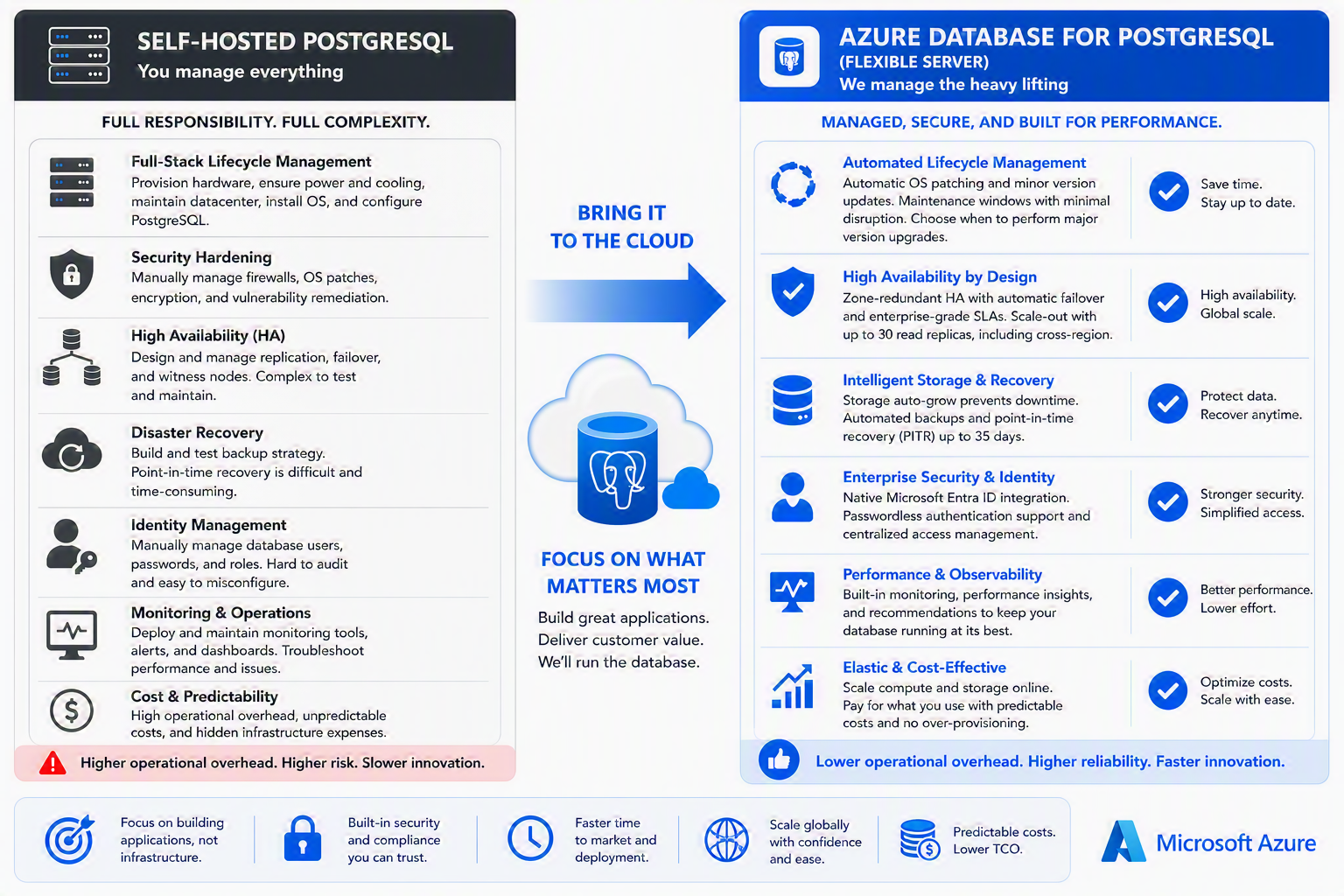
Managed PostgreSQL vs. self-hosted PostgreSQL: Key benefits and trade-offs
Lauro Ojeda
Summary This post is for technical decision makers evaluating where to run production PostgreSQL workloads. It compares two valid operating models—self-managed PostgreSQL and a managed database service—through business and operational outcomes: control, engineering capacity, resi